Community @ The Turning Gate
Support community for TTG plugins and products.
NOTICE
The Turning Gate's Community has moved to a new home, at https://discourse.theturninggate.net.
This forum is now closed, and exists here as a read-only archive.
- New user registrations are disabled.
- Users cannot create new topics.
- Users cannot reply to existing topics.
You are not logged in.
- Topics: Active | Unanswered
#101 CE4 Stage » Feature Request for Twenty Twenty compare » 2015-04-11 12:15:06
- alfred
- Replies: 1
I am using the twenty twenty compare function as part of my bird photography for illustrating subtle differences of difficult to seperate species.
For this purpose it would be nice if either the caption of both photos being compared would be shown and not only one or if the label text would be available as part of the publisher UI.
My way around at the moment is creating a new template for every compare instance with individual label text, which is time consuming, especially when updates occur.
Or is there a more elegant way, which I have not picked up on?
#102 Re: CE4 Publisher » Heading/Title » 2014-09-27 18:51:36
Dave,
I have a publisher created album here: http://www.fotowarkstee.de/galleries/bi … ntechinus/
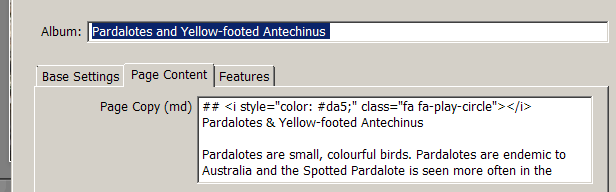
and in order to have a title and description for this album I had entered this under the Publisher album "Page Content" tab using markdown (I totally agree with Mathew that this is easy to learn and do):
maybe this helps?
Alfred
#103 Re: CE4 Stage » Stage 6.1.0 Beta 3 Available » 2014-09-23 20:20:36
Sorry for dropping a "t" from your name - that was not intentional!
#104 Re: CE4 Stage » Stage 6.1.0 Beta 3 Available » 2014-09-23 19:43:26
Hi Mathew, what a difference due to a simple additonal "0" ... fixed my problem.
#105 Re: CE4 Stage » Stage 6.1.0 Beta 3 Available » 2014-09-22 22:28:55
Hmm, its on my face right now....
I have downloaded the new version, created a revised template whith the slider set to 20% (that was the only change) using my stored template and what worked before does not work anymore - I can not move the slider. It looks good in Lightroom though.
Is there anything else I need to set?
Link is here: http://www.fotowarkstee.de/galleries/bi … bird-story/
#106 Re: CE4 Stage » compare tweny-twenty » 2014-09-13 10:25:09
I have tidied up my galleries and removed some and replaced the quick and dirty trial versions with the final ones, so some of the links from earlier postings will not work anymore. These two using the twenty-twenty function are remaining for the time being:
http://www.fotowarkstee.de/galleries/bi … ird-story/
http://www.fotowarkstee.de/galleries/bi … r-compare/
@ Matthew: I can easily live with whatever the final solution is. Thanks again for the product and should I have had doubts whether the update would be worth it - not anymore!
#107 Re: CE4 Stage » compare tweny-twenty » 2014-09-12 20:31:02
Here is a little story told via twenty - twenty. I enjoy exploring the options.
http://www.fotowarkstee.de/galleries/bi … ird-story/
To be put on Matt's wishlist (although expecting it to be not possible): Make the Labels Publisher controlled. I am afraid I need to create too many templates otherwise.
#108 CE4 Stage » compare tweny-twenty » 2014-09-11 19:03:26
- alfred
- Replies: 12
Here two examples how I intend to use this great feature:
http://www.fotowarkstee.de/galleries/bi … r-compare/
This example compares a Lesser and a Greater Sandplover, two birds, which very diffcult to distinguish in the field
http://www.fotowarkstee.de/galleries/bi … d-compare/
This example compares a male and a female Golden Shouldered Parrot. Really cool.
This application is probably of little to no interest from a pure photography point of view, but brilliant for birders who want to run an A/B comparison.
The fastest, most elegant and efficient way of doing this I have come across so far. Much, much better than simply switch between two photos or compose one photo from two shots.
Looking forward to get the final version :-) !
#109 Re: CE4 Stage » Multiple Instance Support » 2014-09-10 21:38:58
I have just run a quick try with Beta 6.1 Beta and things show up nicely in Lightroom, but when I create an album with the created template via publisher I only get an empty page. What could I have done wrong?
http://www.fotowarkstee.de/galleries/bi … d-compare/
Alfred
#110 Re: CE4 Showcase » fotowarkstee » 2014-09-08 21:39:25
Thanks, Matt - error fixed :-) Alfred
#111 CE4 Showcase » fotowarkstee » 2014-09-08 20:37:54
- alfred
- Replies: 3
Finally the CE4 version of my web-site is more or less up and running. I have thought long whether it would be appropriate to post this here – there are so many brilliant sites that have been presented already. Being a 100% amateur I can’t compare myself and don’t want to be compared with the work of the professionals shown here.
But in order to say “Thank you” to Matt and the guys active in the support forum I thought I need to get the word out here as well.
It is kind of a challenge for an amateur to get a site up using the CE4 tools, and I definitely needed some help occasionally. The problems I have had where in most cases my own ones: Not reading the documentation carefully enough or the lack of understanding of some subtle things being a non-native English speaker (what the hell is a sneak peak?).
My biggest problem was that I had never really understood the function of the publisher. Although I have been using it, but I had created all Autoindex elements using the respective plug-in and not the album sets provided by publisher. And when I then embarked on the journey of migrating from CE3 to CE4 failing was unavoidable. So I had to restart from scratch and with the help of Rod (mostly) I am here where I am – a happy customer.
Knowing what I know now I can only quote one of Matt’s recent post “You're still not using publisher?! Oh, you are missing out ... ;-)” Very true!
Thanks again for the product and the support so far and here is my site: http://www.fotowarkstee.de
I have not finally decided yet how to use the different layouts, but I am getting there. And I am now waiting for the “sneak peak” version of Stage – I have an application for it you might not think of!
#112 Re: CE4 Stage » Stage 603 showing as 602 in Lightroom » 2014-09-04 22:10:18
Thanks for pointing me to this post!
#113 CE4 Stage » Stage 603 showing as 602 in Lightroom » 2014-09-04 20:52:41
- alfred
- Replies: 3
I am in the process of updating and have noticed that although I have downloded Stage 603 and have it properly installed, it still says version 602 in Lightroom. Is this OK? I have dowloaded again and re-installed, but not change.
Alfred
#114 Re: CE4 Publisher » Pages Gallery managed by publisher » 2014-08-11 21:14:56
Hi Ben, Rod and Fredy thanks a lot for the help - much appreciated. I think I got it in place now. The deletion happended in the first place when I started over again, coming from my problems with not having understood the use of Publisher to create Autoindex folders. I have created them in the past with CE3 always directly via Autoindex. I had then used Daniel Leu's Breadcrumbs code which worked fine at that time. It all got messy after the migration attempt which did not really work due to not having produced the Autindexes via Publisher (I think). At that point I had not spotted that there was a database in the background and thinking I could delete everything and start fresh - not realising that there was information stored in the DB. I write all of this hoping that eventually others might have some benefit from the mistakes I have made and the misunderstandings that have occured.
Anyway thanks again, and I will now upload my galleries again. Ahh, I will not delete things again within galleries :-)
Alfred
#115 Re: CE4 Publisher » Pages Gallery managed by publisher » 2014-08-11 06:48:16
Hi Rod,
I can see that files are missing in the pages-gallery (no index file for example). So I have started again by deleting the pages-galler folder and then tried to publish via Publisher. I get the follwoing error message:
Unable to perform action: uploadRendition
Message: path was not found: ./../../galleries/pages-gallery
When I create the folder externally via my ftp client the upload works whitout any error message, but only the photos and thumbnails seem to be exported, no index file etc.
It looks as if Publisher thinks they were there already.
I had a lot of problems when I tried to migrate from CE3 mainly due to the fact the my Autoindex structere had been generated via manual Autoindex creations and not being managed via Publisher.
In the meantime I have deleted everything and started from scratch (but not the back-end). It works fine now except this Publisher Gallery problem.
Is there a possiblility that there is somehting remaing in the back-end from the early days preventing Publisher to create the pages-gallery? Should I go for a clean start and re-installing the back-end parts as well?
Alfred
#116 CE4 Publisher » Pages Gallery managed by publisher » 2014-08-10 21:22:49
- alfred
- Replies: 13
I thought I had manged to solve my problems, but here is another one: I cannot get a Publisher managed gallery for Pages to work.
I have published the site via Pages and have checked the tick-box to allow "Page replacement by Publisher" (set yes) and republished what Pages has produced.
I have created an album with publisher and entered a slug "pages-gallery" and used the settings described in the documentation.
The only thing I find unusual (not mentioned in the documentation) is the fact that I had to manually create a "pages-gallery" folder inside "galleries" and give it write access before I could upload the album. Before I got an error message.
But once I uplodaded the album, there is no effect, the homepage slide show is what I have created using Pages and not from Publisher.
The link is here: http://www.fotowarkstee.de/index.php
Where is my mistake? Thanks for any hints.
Alfred
#117 Re: CE4 Pages » galleries in breadcrumbs not showing - solved » 2014-08-06 21:43:57
Fixed.
I had overlooked to upload the new "gallery.xml" file which lives inside the "galleries" directory created by the new pages version.
Alfred
#118 CE4 Pages » galleries in breadcrumbs not showing - solved » 2014-08-06 20:31:40
- alfred
- Replies: 3
I have gone through the latest round of updates and everything seems to work except that the breadcrumb trail only shows a starting"G" as opposed to the expected "Galleries" as before. Not sure where to look for a fix.
Example here: http://www.fotowarkstee.de/galleries/bi … s-parrots/
Alfred
#119 Re: CE4 Pages » icon problem in Firefox - solved » 2014-08-05 20:55:33
Thanks Fredy and Matthew!
Those who can read have a clear advantage - should have found that myself. I need to stop fixing those problems in the middle of the night. Unfortunately I have to work during day-time ...
Cheers Alfred
#120 CE4 Pages » icon problem in Firefox - solved » 2014-08-04 23:00:58
- alfred
- Replies: 3
I have updated CE4 pages with the new Awsome 4 syntax and the icons are back, but I face the following problem:
The icon (and the incons on the gallery slide show on the homepage as well) do not show up correctly in Firefox unless I hit the home button again. This happens only the very first time I load the homepage. Once I hit Home again or have switched to any other page it is OK.
It looks like this: 
This occurs only in Firefox, it looks OK in IE. I have cleared the browser cache but that does not resolve the problem. Any idea what is causing this?
the link to the page: www.fotowarkstee.de
#121 Re: CE4 Auto Index » font size for gallery description » 2014-08-03 14:09:51
Thanks, Rod - that works fine and helped me a lot!
Sorry for all the questions that must look silly, but I am touching these things only after a re-work like implementing a major upgrade ...
Alfred
#122 CE4 Auto Index » font size for gallery description » 2014-08-03 13:29:25
- alfred
- Replies: 2
I would like to change the font-size (make the text slightly bigger) in the descriptions of galleries in an Autoindex created via Publisher album sets.
I have scanned the templates which I have created to be used by Publisher for Autoindex as well as for the Gallery template used by Publisher to created the actual albums and can't identify the place where to do this.
The only way I have been able to increase the font size was by changing the Base Font-size for the whole page in the Pages template what is not exactly what I want to do.
Any hint how I could achieve what I want?
#123 Re: PHPlugins (CE4) » dynamic mastheads for CE4 » 2014-08-02 10:21:55
Hi Rob,
thanks for this advice. What I have found through your first link helped me to achieve what I needed. I'll delay any further work untill the dynamic masthead tutorial is online. I needed to learn though that the option "Keep away from edge" for the identity plate needed to be unchecked. Thanks again for your support.
Alfred
#124 PHPlugins (CE4) » dynamic mastheads for CE4 » 2014-08-01 20:14:07
- alfred
- Replies: 12
Hi there,
I had successfully implemented dynamic mastheads in CE3, but the method used there can obviously not simply be copied across to CE4.
I have Custom CSS enabled and this works (red-background test), but copying the old CSS code and the related images for dynamic mastheads as described here: http://ce3wiki.theturninggate.net/doku. … _mastheads does not do the job in CE4.
Any suggestion how to do this or where to read further?
Alfred
#125 Re: CE4 Publisher » Error message after gallery migration » 2014-08-01 19:26:43
Hi there,
I post my question here, because this is the only place I find where a reference has been made to using dynamic mastheads in CE4.
I had successfully implemented this in CE3, but the method used there can obviously not simply be copied across to CE4. I have Custom CSS enabled and this works (red-background test), but simply copying the old CSS code and the related images does not do the job.
Any suggestion how to do this or where to read further?