Support community for TTG plugins and products.
NOTICE
The Turning Gate's Community has moved to a new home, at https://discourse.theturninggate.net.
This forum is now closed, and exists here as a read-only archive.
You are not logged in.
I tried what you suggested and it doesn't work. I added the following to the Photo Caption field:
{Title} - {Filename} - {Caption}
I still only see the caption
These metadata fields have text in Lightroom, plus they are the same files I use in my CE4 galleries, which correctly picks up the metadata.
Any thoughts on what else could be causing this issue?
In Image Metadata > Photos Title you see:
Photos Title
Used to fill the img tag's title attribute.
This Title field is used for the image tag's title attribute and is not meant to appear beneath the Photoswipe image. If you want the Title metadata to be included beneath the image, add the token to the Photos Caption field. For example, to display the filename and the title:
{filename}, {Title}Or use any separator you wish if you don't want to use a comma.
I notice that the tray copy appears in the condensed menu when it is selected
One thing I do notice is that the home page text, which is located in the Tray 01 Copy, and appears in a column on the right side of the page, this text disappears when I resize the browser window to a smaller size. I was hoping it might automatically adjust so that it appears below the slide show.
thanks, the mystery is solved. I logged out of Backlight Admin, and the slideshow (hidden gallery with a slashed-eye) disappeared.
for some reason it just started working, not sure why. I didn't touch anything in the Backlight => Publisher => Top-level Galleries in Backlight's menus. I did look there, but it doesn't list my basic default home page template that I have set as the page templates for everything else.
OK, now it seems to be working. Does not appear on either the gallery page or pull down menu, which is what I want. I am not sure what I did to fix it. I was changing the template settings for another reason.
I do not want it to appear in the pull down menu. I also do not want it to appear on the gallery page, which it does in Chrome. Interestingly, it does not appear on the gallery page in Edge.
I have set masthead color settings etc. to the default home page template. It is also set as the page template for Album Sets and Albums, the About page and the Contact page. These color setting are displayed in the home page, about page, contact page, and individual gallery pages, but not in the main gallery page, which displays a thumbnail for each gallery.
How do I get the default home page template settings to be displayed by the main gallery page?
Daniel, I need to clarify, the slideshow gallery doesn't appear on the pull down menu, but it does appear on the gallery page.
yes it did, thanks
How do I remove a gallery from my website? I could delete the album in Lightroom, but what effect will this have on its gallery on my website?
Did you create a new Gallery Album and not an Gallery Album set using Backlight? Do you have a link?
I created a new Gallery Album
here is a link: http://www.sweetlightgallery.com/test/
Note the site is very rough, I just installed backlight yesterday and still am learning how the templates and pages work together.
You mean having something else than fading?
No, I like the fading, just how long the fade takes.
Java is something different that javascript. Javascript is an integral part of all browsers and can't be disabled. So no worries! Otherwise CE4 and Backlight based websites wouldn't work either since they use javascript as well.
Thanks for explaining
Hi Daniel,
This is great. I created a 3 image slide show on my test website home page. It seems to work as illustrated on your site. However the slideshow album shows up on my gallery page. I set the album up the way you showed, except for Template I left it at Standard Album Template, my only option. I made sure to check "Hide from Album Set". Any thoughts as to why this would be happening?
A couple of other questions:
Any way to control the transition time between slides?
Will the slideshow only function if java is turned on in the browser? Is it possible to disable java in browsers? I am wondering how many people typically have browsers set so that they can run the slideshow?
Thanks for taking the time to create your tutorial.
Got my slideshow implementation documented. The example is over on my site at http://stage.danielleu.com/slideshow.php and the setup instructions are over on my blog.
It is easy to do and I am happy with the result.
its now working, I had to add the root folder for the test site, /test/photos/generations.jpg
I can create my own slide shows. Where are there instructions for including a slide show file?
Thanks for your help
I also tried:
<img src="photos/generations.jpg" width="300" class="alignleft" alt="some descriptive text" title="More descriptive text" style="border: 2px red solid; padding: 0px;">
Still no image, just a rectangular box with some descriptive text
Thanks for the suggestion, unfortunately it is not working for me. I included the following in the main Page Copy:
<img src="photos/generations.jpg" width="300">
I created the folder, photos, and uploaded the named jpeg file into the folder. I saved the page with the html code, cleared my browser cache and then accessed this page in the website. There appears a long rectangular box at the start of the text, which is where I placed the html code, but no photo.
Any thoughts?
I did not change the metadata, it is already in the Titles and Caption fields in Lightroom, prior to publishing. So I am not sure what republishing will do, since metadata has not changed.
in my CE4 website, I have a slideshow on the home page that automatically shows a selection of my photos. Also on my about page, I have a single jpeg file displayed. This was fairly straight forward to set up, but I can not figure out how to accomplish the same thing in my Backlight test website.
Any help is greatly appreciated.
Under Image Settings in the album template designer, there is a field allowing you to configure the image caption.
Large image presentation picks up the Photos Cation metadata, but not the Photos Title. Under Photos Title, I have {Title}, but it is not picked up when I view the large version of the photo. The caption is correctly picked up.
The Thumbnail presentation appears to work OK.
I have my CE4 site, including cart, working smoothly. I want to create a Backlight test site including cart, fully develop and test the site, while simultaneously keeping my CE4 site running until I feel confident to switch over to the Backlight site. Questions:
1. I understand I can create a sub folder "test" in my root directory. I follow the Backlight install instructions but treat the sub-folder, test, as the root directoy and copy the Backlight-Pages folders/files into the test folder and follow the other instructions. Is this correct?
2. Regarding TTG-Publisher plugin: can I install this even though I already have the CE4 Publisher program installed in Lightroom?
3. Once I feel my Backlight test site is ready to go public, to replace my CE4 site with the Backlight test site: delete all of the CE4 folders and files. Copy every folder/file in the test sub-folder into the root directory. Will this work?
I have done a search on the forum and read other posts regarding the points raised above, but I want to summarize to make sure I am clear on how to proceed and that I do not cause problems with my current site.
Greatly appreciate any feedback.
Ken
I tried Daniel's suggestion and it did not work, when I logged into my PayPal account, I was not given an option to pay with a credit card. I ended up using my PayPal balance to purchase the software. From my standpoint, this is not a good way to purchase software for my photography business. For my accounting records I like to have purchases made with a credit card, not by debiting a bank account (which is what I consider PayPal).
I order the Backlight Pages+Gallery separately from ordering Backlight Cart, since the ordering process would not accept two coupon codes, which is OK. Just thought I would mention this.
It would be nice if the problems with PayPal could be corrected for other TTG customers. I wasted an hour of time trying to use my credit card plus forum exchanges. I realize this isn't your fault but has something to do with PayPal. I do not know if it would do any good for you to ask PayPal not to require customers to create a PayPal account, when they only want to use their credit card.
I am looking forward to setting up a BackLight test site.
Thanks for your help,
Ken
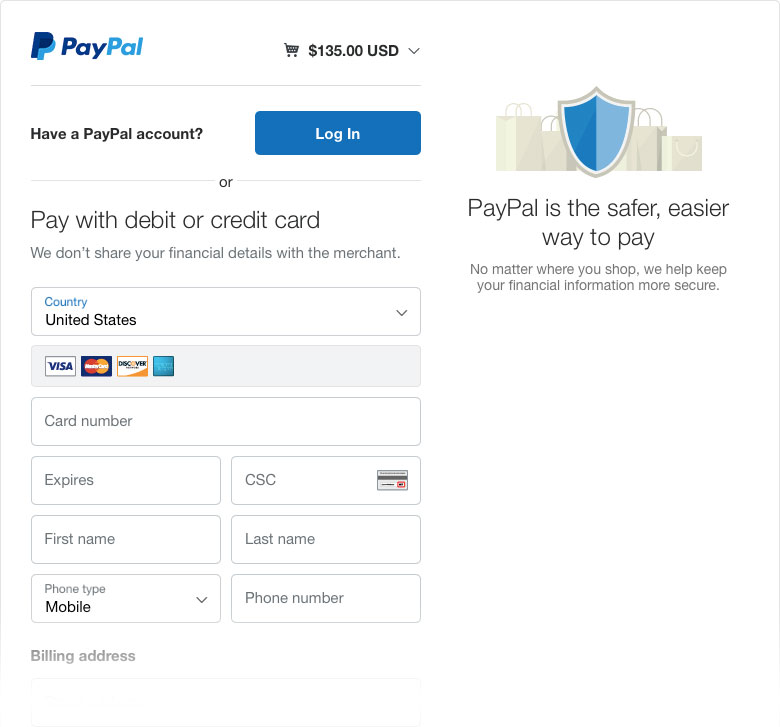
I took a screen capture of the PayPal site. I am not sure how to attach it to this forum reply? My PayPal screen looks like yours, except below the credit card billing address is a section titled "Create Your PayPal Account", and below this section is the Agree and Continue button. After filling in my credit card number and clicking on this button, PayPal highlights the input fields under the Create Your PayPal Account section. In other words it is forcing me to create a PayPal accounting instead of accepting my credit card information. When I enter in my email address in this section, it recognizes the email address and that I already have a PayPal account and then tells me to login. So in short, it refuses to let me use a credit card and instead is forcing me to log in to my PayPal account.
I can try what Daniel suggests, but it is a hassle because I keep my PayPal login info encrypted and so I have to go through a special process to access my account.
It used to be simple purchasing the TTG plugins and upgrades. This is why I am worried for my customers, who may know nothing about PayPal and feel comfortable just entering their credit card information. If this simplicity is interfered with and customers feel they have to create a PayPal account to purchase my prints, then I will loose them as customers.
When I try to check out while not logged into PayPal, I see this:
http://community.theturninggate.net/att … eckout.jpg
Looks to me like it will allow me to checkout by credit card.
PayPal should be able to process credit cards, though specifics may vary depending on your account type and settings, your region, or the region of your buyer. What also doesn't help is that PayPal continually changes their policies and practices, and lately keeps changing their website so that settings are in different places than before, or have gone missing completely.
When I attempted to purchase the Backlight upgrades, I was not logged in to my PayPal account, so this should not be an issue. So I still do not know how to purchase using my credit card and not being forced to log in to my PayPal account.
Regarding my current CE4 website cart versus the new Backlight cart, I am confused. Ben you state "CE4 Cart (which works in an identical to Backlight Cart)" and " CE4 and Backlight Cart use a different method of working with PayPal" These statements seems contradictory, please clarify.
To summarize: there are two issues
1. I can not purchase the upgrades using a credit card.
2. Will there be an issue with the Backlight Cart PayPal check out forcing my customers to create a PayPal account, or will it function in the same way the CE4 Cart does and simply give an option to create a PayPal account?
Thanks for your help.
I went through the check out procedure on my site and it appears that PayPal only gives the option of creating a PayPal account for customers wanting to pay with their credit card. This is a relief, though I do not like it that this option even appears on the page. There is still the problem with purchasing the Backlight upgrades using a credit card, in this case PayPal forces you to log-in to your account or create a new account, rather than giving the option.
So I am still stuck, how do I simply purchase the upgrades using a credit card?
I added Backlight + Pages + Cart to my shopping cart. When trying to check out, PayPal offers the option of paying with PayPal or a credit card. I want to pay with a credit card and fill in all of the necessary information. When I try to check out, PayPal tries to force me to create a PayPal account, but I already have a PayPal account, so it tries to force me to log in to my PayPal account, which I do not want to do, since I want to pay with a credit card. This has never happened in the past, PayPal trying to force me to log in to my PayPal account even though I simply want to pay with a credit card. How do I purchase the Backlight upgrades with a credit card?
This raises an extremely important issue. I have been using CE4 Cart since it came out. Customers can purchase my prints using a credit card and are not forced to create a PayPal account, at least in the past they were not. However, having now just experienced the check out process for the TTG software, I am concerned that this a change for all PayPal checkouts, people who simply want to use their credit card to pay for their print order are now being forced to create a PayPal account. If so, this is very bad, and significantly decreases the value of the CE4 Cart and the Backlight Cart. I haven't tested out a purchase from my website to see if in fact PayPal now forces people to create a PayPal account, even though they simply want to pay with their credit card, but if PayPal does this when attempting to purchase the TTG software, then I assume it now does it for my website.
This is a disappointing state of affairs and I hope I mistaken in what I am experiencing. Please explain what is going on?