Community @ The Turning Gate
Support community for TTG plugins and products.
NOTICE
The Turning Gate's Community has moved to a new home, at https://discourse.theturninggate.net.
This forum is now closed, and exists here as a read-only archive.
- New user registrations are disabled.
- Users cannot create new topics.
- Users cannot reply to existing topics.
You are not logged in.
- Topics: Active | Unanswered
#26 Re: CE4 Pages » Ugh...everything was working well until... » 2015-06-29 12:37:44
I also tried to update the albums here:
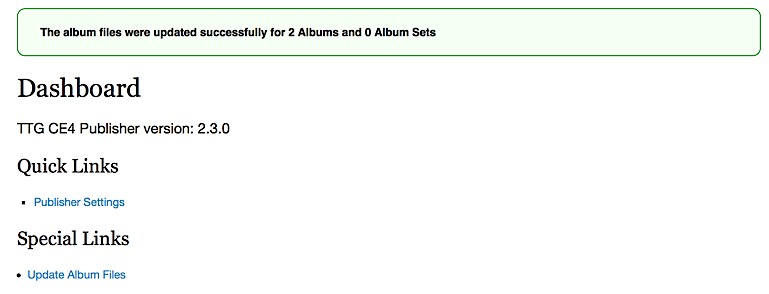
No success on the actual webpage.
Thanks.
#27 Re: CE4 Pages » Ugh...everything was working well until... » 2015-06-29 12:35:16
I tried logging onto TTG-BE Admin and it shows that there are 2 albums even though I had previously deleted them:

I am going to try and delete the Publisher from LR and see if that can be reinstalled and see the new galleries? This seems painful if I ever update Gallery templates in the future?
Thanks.
#28 Re: CE4 Pages » Ugh...everything was working well until... » 2015-06-29 12:27:00
Not sure if this helps, but when I uploaded the Auto Index "package" I had uploaded to the "galleries" subfolder and not the website root...
Thanks.
#29 Re: CE4 Pages » Ugh...everything was working well until... » 2015-06-29 12:13:54
Yeah. I looked at the post before adding mine in hopes it was correct. Well I created another Pages export with "Descriptive" album and not Iconic and the error message goes away. Here are some screenshots of settings(and other items)
This is the phantom albums that won't seem to go away...
This is on my FTP which shows that there are no albums there at that time...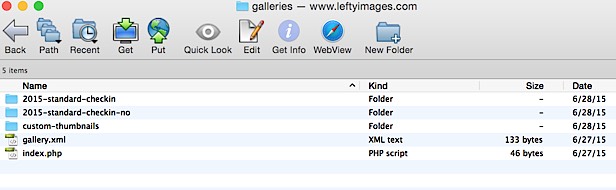
This shows what the options are in the Publisher even though I closed down LR and opened it up again. I exported new Galleries and renamed them but the new ones are not "refreshing" to be seen? 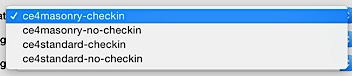
I also created another Publisher instance to see if I just need to start over with Publisher but it still did not refresh...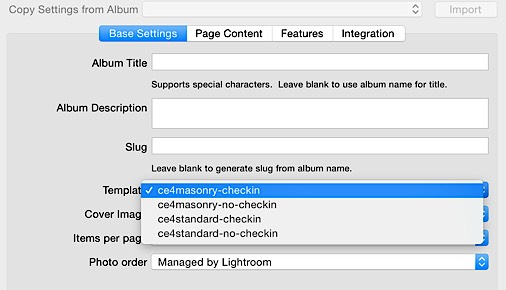
This was the setting in Pages (I tried changing the columns from 2 to 4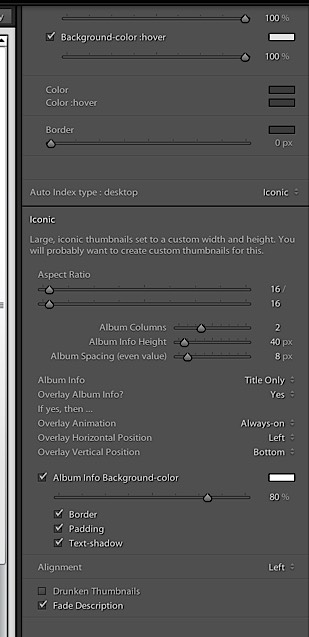
This was the setting in AutoIndex 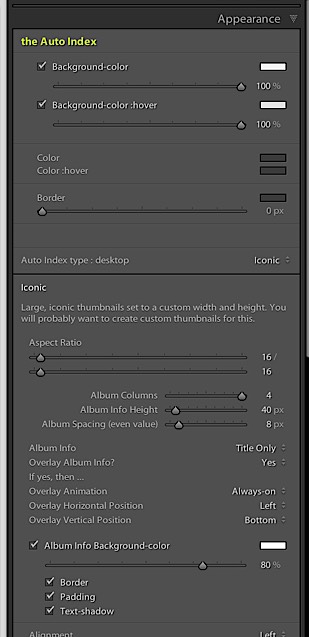
If the issue was with AutoIndex, I could probably live without it.
If the issue was that I had not checked "Iconic thumbnails" in the Galleries, I have since checked them, exported, and uploaded, but Publisher can't see them.
-----------
As an aside, it seems also that if Publisher publishes an album with images with a LR export watermark preset, if I remove the images, delete the album (which removes it from the website as seen on FTP client) and then re-create the album brand new de novo as well republish the album, it does not update the watermark. Whatever was previously watermarked remains? Not sure if there is a "refresh" issue?
I also tried refreshing the "cache" in Safari...I will try and open this in Firefox to see if it is a browser issue?
Thanks again...
#30 Re: CE4 Pages » Ugh...everything was working well until... » 2015-06-29 11:39:19
This is the error message. I'm going to try and export a Pages without the iconic option...
<% if model.autoindex.type.desktop == 'descriptive' then %>
<div class="album grid_<%= math.floor( 12 / model.album.settings.columns ) %> clearfix">
<div class="album-mantle clearfix">
<a class="album-link" <% write("<?php print $AI_TARGET; ".."?"..">")%>></a>
<div class="album-core clearfix">
<div class="album-thumbnail clearfix" style="background-image: url(<% write("<?php print $albums[$i]['thumbnail']; ".."?"..">")%>);">
<a href="<% write("<?php print $albums[$i]['url']; ".."?"..">")%>"><img alt="Album Title" src="<% write("<?php print $albums[$i]['thumbnail']; ".."?"..">")%>" class="album-image" /></a>
</div>
<div class="album-info">
<p class="album-title"><% write("<?php if (isset($albums[$i]['access']) && $albums[$i]['access'] == 'locked'){ ".."?"..">")%><span class="locked"><i class="fa fa-fw fa-lock"></i> </span><% write("<?php } ".."?"..">")%><% write("<?php print $albums[$i]['title']; ".."?"..">")%></p>
<p class="album-description"><% write("<?php print $albums[$i]['description']; ".."?"..">")%></p>
<% if model.album_info.fade then %>
<p class="album-overlay"></p>
<% end %>
</div>
</div>
</div>
</div><!-- .album -->
<% elseif M.autoindex.type.desktop == 'ce4-freewall' then %>
<div class="brick" style="height: <%= math.floor(M.photoSizes.thumbnails.height + (M.freewall.margin * 2) + (M.album.border.width * 2)) %>px;">
<div class="album clearfix">
<a class="album-link" <% write("<?php print $AI_TARGET; ".."?"..">")%>><img alt="Album Title" src="<% write("<?php print $albums[$i]['thumbnail']; ".."?"..">")%>" class="album-image" /></a>
<ul>
<li class="album-title"><% write("<?php if (isset($albums[$i]['access']) && $albums[$i]['access'] == 'locked'){ ".."?"..">")%><span class="locked"><i class="fa fa-fw fa-lock"></i> </span><% write("<?php } ".."?"..">")%><% write("<?php print $albums[$i]['title']; ".."?"..">")%></li>
<% if M.mosaic.Title == 'titleanddescription' then %>
<li class="album-desc"><% write("<?php print $albums[$i]['description']; ".."?"..">")%></li>
<% end %>
</ul>
</div>
</div><!-- .brick -->
<% elseif model.autoindex.type.desktop == 'iconic' then %>
<div class="album grid_<%= math.floor( 12 / model.album.settings.columns ) %> clearfix">
<div class="album-mantle clearfix">
<a class="album-link" <% write("<?php print $AI_TARGET; ".."?"..">")%>></a>
<div class="album-core clearfix">
<div class="album-image mosaic-backdrop"
style="background-image: url(<% write("<?php print $albums[$i]['thumbnail']; ".."?"..">")%>);">
</div>
<div class="mosaic-overlay">
<div class="album-info">
<p class="album-title"><% write("<?php if (isset($albums[$i]['access']) && $albums[$i]['access'] == 'locked'){ ".."?"..">")%><span class="locked"><i class="fa fa-fw fa-lock"></i> </span><% write("<?php } ".."?"..">")%><% write("<?php print $albums[$i]['title']; ".."?"..">")%></p>
<% if model.mosaic.Title == 'titleanddescription' then %>
<p class="album-description"><% write("<?php print $albums[$i]['description']; ".."?"..">")%></p>
<% if model.album_info.fade then %>
<p class="album-overlay"></p>
<% end %>
<% end %>
</div>
</div>
</div>
</div>
</div><!-- .album -->
<% elseif model.autoindex.type.desktop == 'text-only' then %>
<div class="album grid_<%= math.floor( 12 / model.album.settings.columns ) %> clearfix">
<div class="album-mantle clearfix">
<a class="album-link" <% write("<?php print $AI_TARGET; ".."?"..">")%>></a>
<div class="album-core clearfix">
<div class="album-info">
<p class="album-title"><% write("<?php if (isset($albums[$i]['access']) && $albums[$i]['access'] == 'locked'){ ".."?"..">")%><span class="locked"><i class="fa fa-fw fa-lock"></i> </span><% write("<?php } ".."?"..">")%><% write("<?php print $albums[$i]['title']; ".."?"..">")%></p>
<p class="album-description"><% write("<?php print $albums[$i]['description']; ".."?"..">")%></p>
<% if model.album_info.fade then %>
<p class="album-overlay"></p>
<% end %>
</div>
</div>
</div>
</div><!-- .album -->
<% end --[[ autoindex.type ]] %>
#31 CE4 Pages » Ugh...everything was working well until... » 2015-06-29 11:02:05
- leftyimages
- Replies: 31
I hope Rod or Matthew or someone else can help me here. Not sure if I should start all over...
I had uploaded everything yesterday and everything was working as directed. I made a decision to change the galleries from Descriptive to Iconic. I also noticed that I had not installed Auto Index so thought I would create and install that as well. After making changes to Pages, Galleries, and Auto Index in "web" in LR and exported and uploaded, I received that massive "Error" message (which I did not save). In the middle of trying to "revert" back and problem solve whether it was at the Pages, Auto Index, or Galleries level, I have a couple of issues. As follows.
I have a copy of my Pages export from 6/27. When I upload that, the error message does not show up.
When I upload export from 6/28 the error message shows up.
I (for good and/or bad) tried deleting the blank gallery templates and rebuilding them and renaming them to see if that was the error.
I also tried deleting the entire galleries subfolder via FTP (which was bad!) since the galleries were deleted directly and not via Publisher in LR (don't worry, won't do that ever again as long as I can remember).
Anyway, here are now my issues:
#1 on Galleries page, there are residual "space invader" icons
http://www.leftyimages.com/galleries.php
#2
I can't post screenshots, but in Publisher in LR, the available "templates" are the original 4 from yesterday and not the new ones that I created and uploaded today. I tried naming them the same, naming them something new, but it does not seem to refresh.
#3. I'm not sure what I did wrong trying to change from "Descriptive" to "Iconic" albums in Gallery.
My Settings in Auto Index are:
Auto Index type: desktop: Iconic
Aspect ratio 16/16
Album Columns 4
Album Info Height 40px
Album spacing 8px
Album Info: Title Only
Overlay Album Info: Yes
Overlay animation: Always-on
Overlay Horizontal: Left
Overlay Vertical: Bottom
Album Info Background-color (white) at 80% opacity
Border, Padding, Text-shadow all checked
Alignment: Left
Drunken Thumbnails (unchecked)
Fade description checked
In Pages: I tried to put the same settings:
Auto Index type: desktop: Iconic
Under Iconic, the settings are nearly identical (I just noticed I had 2 columns instead of 4?)
40px
8px
Title only
Yes
Always on
Left
Bottom
White at 80%
Same checkboxes.
I'm going to try and export a pages with 4 columns and upload and maybe you can see the "error" message.
Thanks in advance
Francis